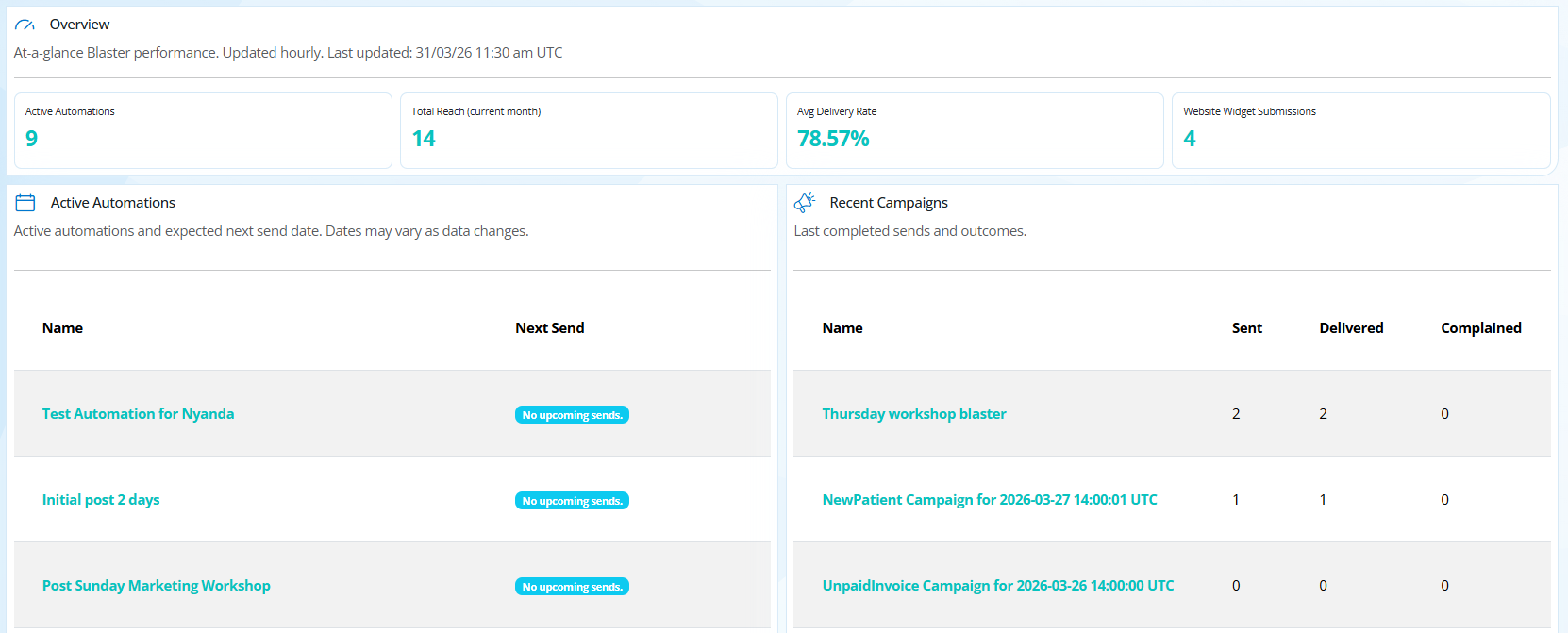
The Blaster Dashboard provides a quick overview of your marketing automations, recent email campaigns, and overall email performance.
From this page you can quickly see how your automations are performing, when emails are expected to send next, and review the results of recent campaigns.
On this page
- Helpful Links
- Important Information
- Overview metrics
- Active Automations
- Recent Campaigns
Helpful Links:
Important information
- The dashboard statistics update periodically, not instantly.
- Marketing Automations run approximately every 15 minutes.
- Campaign results may take time to appear as emails are sent in batches.
- Large email campaigns may take several hours to complete sending.
- To view more in depth information on either marketing automations or email blasters, see articles above.
Overview Metrics
The overview panel provides a quick summary of your Blaster performance.
Active Automations
Shows the number of marketing automations currently active in your clinic.
Active automations run automatically and send emails when patients meet the criteria you have defined. See this article for more information.
Total Reach (Current Month)
This shows the total number of patients who have received emails from Blaster during the current calendar month.
This includes emails sent from both:
Average Delivery Rate
This metric shows the percentage of emails successfully delivered to recipients.
A high delivery rate indicates that your emails are successfully reaching patient inboxes.
If delivery rates drop, it may indicate:
- invalid email addresses
- unsubscribes
- spam filtering by email providers
Website Widget Submissions
This shows how many people have submitted their details through your Website Lead Capture Widget.
These contacts are added to your system as new leads and can automatically receive follow-up emails using Marketing Automation.
Active Automations
The Active Automations section shows a list of all marketing automations currently enabled in your clinic.
For each automation you will see:
- Name – the automation title
- Next Send – when the next email run is expected
Automations check regularly for patients who meet the trigger conditions. If no patients currently qualify for a future run (based on delays), the dashboard may display “No upcoming sends.”
Recent Campaigns
The Recent Campaigns section shows the most recently completed email sends.
These may be:
- manual Email Blaster campaigns
- campaigns automatically created by Marketing Automations
For each campaign you will see:
- Name - automation campaigns are automatically named based on the trigger and send date.
- The campaign name and send time.
Extra Information:
- Sent -> The total number of emails that were attempted to be sent.
- Delivered -> The number of emails successfully delivered to recipients.
- Complained -> The number of recipients who marked the email as spam. If a complaint occurs, the recipient will automatically be excluded from future marketing emails.