
Certain patient activities can be viewed from the SimpleClinic practitioner app under Activity Feed in the Main Menu.
You can currently view the following:
- Patient online prescription views.
- Patient Prescription actions entered via the Patient Portal Mobile app (e.g. when a patient logs they have taken their supplement).
- When a Patient enrolls in an Online Program.
- When a patient accesses a Program via the Patient Portal.
- When a patient completes a program lesson.
- Chat directly to your patient enrolled in a program.
Please note: more activity items will be added over time.
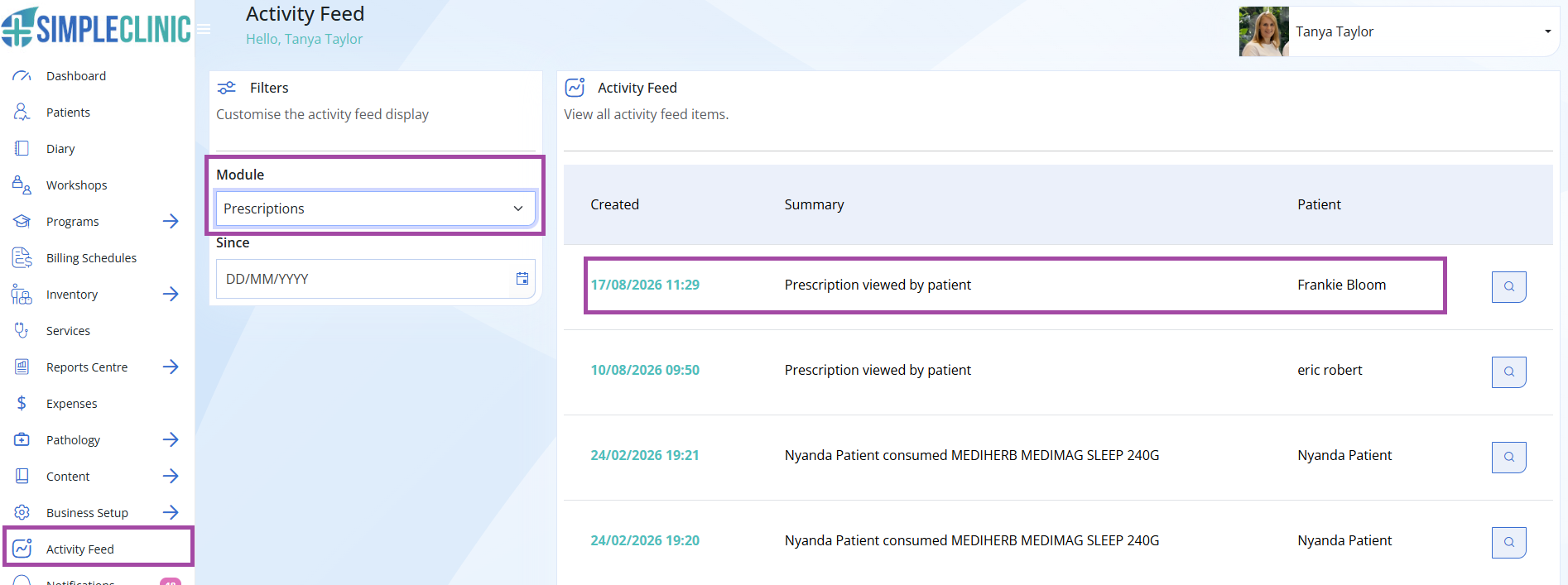
Step 1. Select Activity Feed from the left hand main menu -> filter on the left hand side as needed to view activity.
Under Module -> Select Prescriptions.
- View when a Patient has viewed a Prescription online
- View when a patient has logged taking their supplements via the Patient Portal Mobile App.
- Select the magnifying glass to view the patients prescription.
Step 2.
Under Module select -> Programs.
- View when a patient has enrolled in a Program
- View when a patient has accessed their Program via the Patient Portal
- View when a lesson is completed by a patient in the Patient Portal
- Select the chat button next to the program activity to start a new chat with the patient. See more information on Chat function here.
- Select the magnifying glass to view the patient record.

Example of a chat:
