
Client Retention Rate measures the percentage of existing clients who continue care in your practice over a given period.
Tracking retention provides visibility into the stability of your practice. While new client numbers show growth, retention shows whether clients continue their care journey and remain engaged with your clinic.
Client Retention Rate represents the percentage of existing clients who continue receiving care during a specific time period.
It helps practitioners understand whether clients are continuing treatment plans or leaving the practice.
Simply put, it is a measure indicating your clients trust you and are getting results.
On this page
- Retention Rate Widget
- How retention is calculated
- Definitions
- Example calculation
- Typical retention benchmarks
- How to use retention data
Important Information
- Client Retention Rate measures existing clients who remain active, not new clients joining the practice.
- Retention trends are usually more meaningful when reviewed quarterly, rather than as a single data point.
- To get the 12 month range you need the 12 month range being reported on, and the 12 month range prior, to get the 6 month range you need the 6 month range being reported on, and the 6 month range prior and so on. Data will not be accurate if you have not been with SimpleClinic for that period of time.
- Note reporting is only available at clinic level, not per practitioner at this stage.
Retention Rate Widget
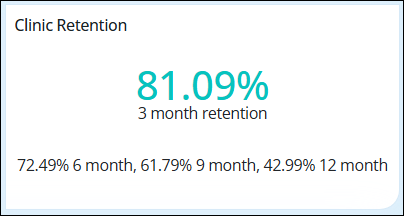
The Retention rate widget is located on the SimpleClinic Dashboard. This can be enabled or disabled as below:
Step 1: Go to Business Setup -> Your Clinic -> Dashboard Settings -> put a tick next to 'Show client retention on the dashboard' to enable and remove tick to disable -> SAVE.
How Client Retention Rate is calculated
To calculate retention manually you need three values:
• Active Clients at the end of the previous month
• New Clients during the current month
• Active Clients at the end of the current month
Formula
Retention Rate (%)
= (Current Month Active Clients – New Clients This Month) ÷ Previous Month Active Clients × 100
This isolates the clients who remained active in the practice.
Example
Previous Month Active Clients: 100
New Clients This Month: 20
Current Month Active Clients: 105
105 – 20 = 85 retained clients
85 ÷ 100 = 0.85
0.85 × 100 = 85% retention
This means 15% of existing clients did not continue care during that month.
Definitions
Active Client = A client who has had an appointment or ordered products within the last month.
New Client = A client who has not had any transaction within the previous 12 months.
Exclusions
- Discovery calls
- Paid masterclasses/workshops
- Retreats
Other rules
- Future appointments are not included
- The report should be viewed as a rolling trend (3, 6, 9, or 12 months) rather than a single snapshot.
- The report calculations are based on the invoices generated.
Retention Benchmarks
Retention benchmarks can vary depending on clinic type and model of care, however general guidelines include:
• Under 80% – may indicate client loss
• 85–90% – strong continuity of care
• 90%+ – excellent retention and structured care pathways
Tracking changes over time is usually more useful than comparing to industry averages.
Using Retention Data
Monitoring retention regularly can help identify opportunities to improve client engagement. Small improvements in retention can increase client lifetime value and improve practice stability.
Common areas to review include:
- Treatment pathways – are clients aware of the expected duration of care?
- Follow-up scheduling – are next appointments clearly recommended?
- Client communication – do clients understand the purpose of ongoing care?
This formula was provided to us by Angela Carroll Coaching. For more information or help on how to interpret Client Retention or for coaching - contact Angela Carroll by clicking this link.
Please note that SimpleClinic is unable to provide individual support or further interpretation of your retention data or figures.