
Each compounding you purchase from the manufacturer to stock in your clinic needs to be added into your SimpleClinic inventory as a compound ingredient. For example, a 420g tub of magnesium!
You can add each one into your inventory from the Inventory-> Items menu, click on the Add New button to create a new inventory item.
Archived or Discontinued Ingredients cannot be added to prescriptions, see this article for more information.
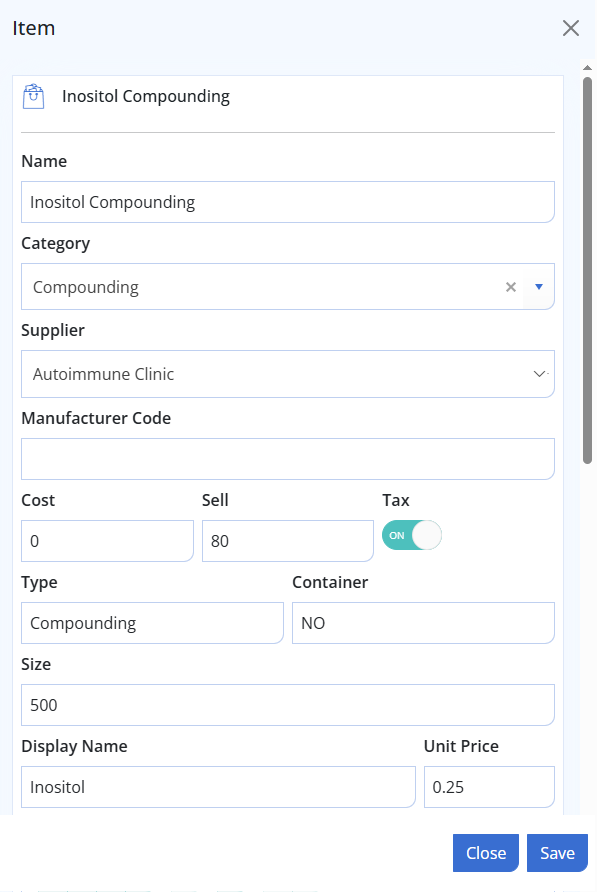
Fill in the details of the compound ingredient as shown above.
- Select "Compounding" for the Category, and "Compounding" for the Product Type, as shown above, to keep items consistent.
- Make sure the "Container" field is set to "No" for each of the ingredients so they will show in the compound builder!
- The Display Name and Unit Price" are new fields which appear when you have selected the product type as Compounding AND selected NO on the Container field. Type in a useful short name for the herb, such as "Magnesium" (which will be displayed on the prescription) and the price is per gram.
Click on OK to save the new compounding item. Repeat for other compounding ingredient items.